Halftime is the trick where the beat drops to half speed while the tempo of the track stays the same – the drums feel twice as slow, heavy and spacious, but everything still lines up on the grid. It is everywhere in trap, phonk, drum and bass and modern hip-hop, and it is one of the fastest ways to make a section hit harder. This guide shows you how to make halftime beats two ways: the quick plugin method, and a free manual one – plus the mistakes that make halftime sound weak, and how to avoid them.
What “halftime” actually means
There is a difference between writing a halftime groove and processing a beat into halftime.
- A halftime groove is a drum pattern where the kick and snare are spaced twice as far apart – kick on beat 1, snare on beat 3, at the same BPM. It feels half-speed but nothing is slowed; you programmed it that way.
- Halftime processing takes an existing beat and slows the playback to half speed in real time, locked to tempo, using a plugin. This is the dramatic “drop into halftime” you hear on the last bars of a hook.
Both are useful, and you will often combine them. This guide focuses on the processing method, because that is the one producers ask about – and then shows how to write the groove too.
The quick way: one plugin
The fastest route is a slowdown plugin on your drum bus. With SLoOWD it is one control.
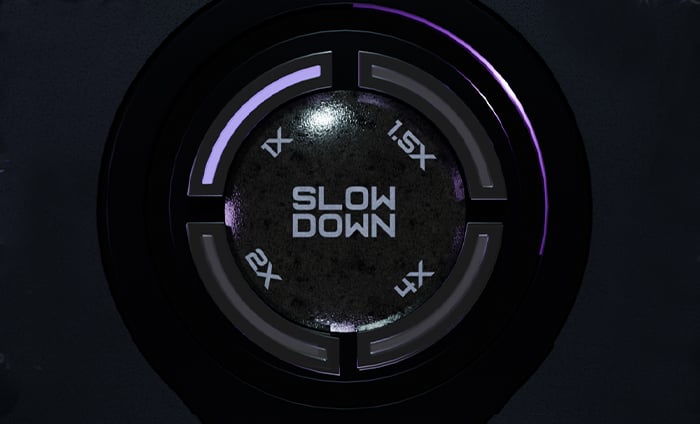
- Load SLoOWD on your drum bus (or the whole beat) as an insert effect.
- Set SLOW DOWN to 2x. That is halftime – the beat now plays at half speed, still locked to your project tempo.
- Use the WET knob to blend. Full wet for a hard drop; back it off if you want to keep some of the original energy underneath.
- Want it slower for a phonk breakdown? Try 4x. Want a subtle drag instead of a full drop? 1.5x.
- Add a touch of Tape Wow and a reverb for the classic heavy, hazy feel.
- Automate SLoOWD’s WET (or a bypass) so the beat snaps into halftime only on the drop, then back out.
That is the whole move. Because SLoOWD also has beat-repeat, pitch and a full FX rack, you can keep building from here – roll the last snare with Loop and Refresh, drop the Pitch for a screwed section, or hit Shuffle for a random variation.
The free way: warp and pitch
No plugin? You can fake halftime manually in any DAW:
- Duplicate your drum pattern to a new clip.
- Time-stretch it to 200% length (so it plays at half speed) using your DAW’s warp/stretch.
- If the pitch rose during stretching, drop it back down to taste.
- Drop this halftime clip in on the section you want.
It works, but it is not real-time, you cannot automate it smoothly, and there are no rolls or FX. For anything beyond a one-off, a plugin is far faster and more flexible.
Writing a halftime groove from scratch
If you want the feel baked into the pattern rather than processed:
- Pick your BPM as normal (say 140).
- Put the kick on beat 1 and the snare/clap on beat 3 (instead of the usual 2 and 4).
- Keep the hi-hats busy – 1/8, 1/16 or triplet rolls – so the groove has energy despite the slow backbeat.
- Let the 808 or bass move underneath at full speed for contrast.
This is the trap/phonk halftime feel without any processing, and you can still drop a plugin on top for the big moments.
Common halftime mistakes (and fixes)
- Everything goes halftime, so the energy dies. Fix: halftime the drums only, and keep melodies, hats and 808s moving.
- The slow hits sound thin. Fix: add reverb and tape so the kick and snare feel big, not empty.
- The transition is abrupt in a bad way. Fix: automate the blend, or use a fill/riser into the drop.
- It sounds sluggish for a whole section. Fix: reserve full halftime for the drop or the last bar or two, not the entire beat.
- The pitch got weird from stretching. Fix: use a real-time plugin (which keeps things clean) or correct the pitch after stretching.
Tips for better halftime drops
- Layer a fast hi-hat roll over the slow kick and snare so the section still moves.
- Use halftime as contrast – it hits hardest right after a busy, full-speed section.
- Add a riser or reverse cymbal into the drop so the slowdown feels intentional.
- Print/bounce the processed section once you like it to free up CPU.
Once you have the halftime drop down, the exact same tools take you into screwed and phonk territory – just add a pitch drop and some tape.
Frequently asked questions
What BPM is best for halftime? Any BPM works – halftime is about feel, not tempo. Trap and phonk often sit around 130-160 BPM with a halftime backbeat.
Do I need a plugin to make halftime beats? No – you can program a halftime groove or time-stretch a clip for free. A plugin like SLoOWD just makes the real-time, automatable drop much faster.
Does halftime lower the pitch? Real-time speed-based halftime lowers pitch as it slows. If you want the slow feel but the original pitch, use a plugin with independent pitch control.
Can I use halftime on vocals or melodies too? Yes – slowed vocals are the basis of the chopped-and-screwed sound, and slowed melodies make great phonk textures.
Wrap-up
Halftime is one of the highest-impact, lowest-effort tricks in modern production. Program the groove for the feel, and use a slowdown plugin for the dramatic real-time drops. A tool like SLoOWD does the slowdown, the rolls, the pitch and the finishing FX in one place, so you can go from idea to a heavy halftime section in seconds.
Get SLoOWD -> VST / VST3 / AU for macOS and Windows.
The post How to Make Halftime Beats (the Easy Way) appeared first on Producer Sources.