“Dark formant” vocals are everywhere in modern rap, drill, horror-trap and
alternative pop — that heavy, oversized, slightly inhuman voice that sounds bigger
and more menacing than the original take. The secret isn’t pitch alone. It’s the
formant.
This guide explains what formants are, why lowering them creates that dark
character, and gives you exact step-by-step settings in PITCH FIEND.
What is a formant (in plain terms)?
Your voice has two things going on at once:
- Pitch — the note you sing (how high or low).
- Formants — the resonances of your throat, mouth and head that make you sound
like you, and that signal the size of the speaker. A big body = low formants.
A small body = high formants.
That’s why a child and an adult can sing the same note but sound completely
different. Same pitch, different formants.
Dark = low formants. Push the formants down and the listener’s brain hears a
larger, heavier, more threatening source — even if the pitch barely moves.
Why not just pitch it down?
Pitch a normal plugin down and you drag the formants down with it — you get the
classic “slowed-down tape” effect, which can sound muddy or fake. The trick to a
controlled dark vocal is shifting the formant independently so you decide how
big the voice gets, separate from the note.
That independent control is the core of PITCH FIEND.
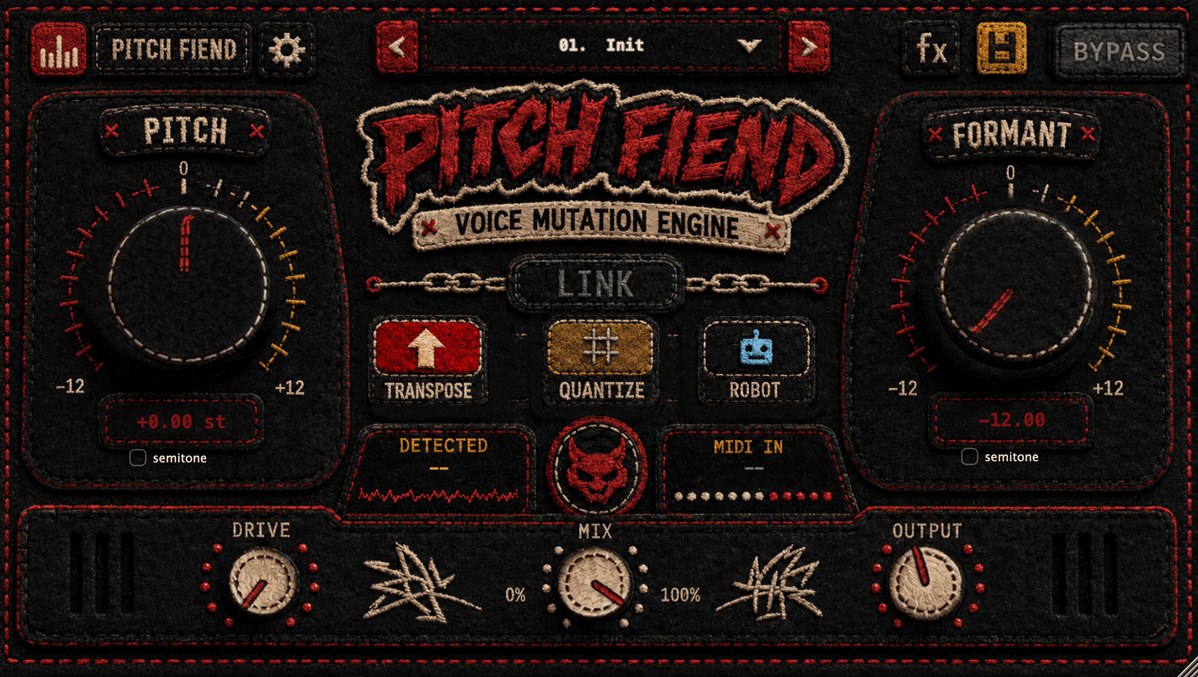
Step-by-step: dark formant vocals (villain preset)
- Load PITCH FIEND on your vocal (or duplicate the lead to a parallel track).
- Mode: Transpose.
- Formant: −5 to −8. Start here — this is the main move. Listen to the voice
get bigger and darker without changing the melody. - Pitch: 0 to −3. A small pitch drop adds weight. Keep it subtle so the
performance stays intelligible. - Formant Quality: Deep for the smoothest result on an exposed lead.
- Drive: 25–45 %. A little saturation adds menace and helps it cut.
- Mix: 100 % to fully transform, or 60–85 % to keep some of the natural voice
underneath.
Prefer a shortcut? Load the Deep Villain preset and adjust from there.
Taking it further
Demon / monster ad-lib
- Formant −8 to −10, Pitch −7 to −12, Drive 50–65 %.
- Add reverb (Big Mystic or Infinity, Wet ~25 %, Pre-Delay ~20 ms) so it
looms behind the main vocal. - Presets: Drill Demon, Demon Adlib.
Oversized but still clean
- Formant −4 to −6, Pitch 0, Drive 15 %.
- High-pass around 90–110 Hz in the FX rack so the low voice doesn’t clash with
the bass or 808.
Wide, cinematic darkness
- Add chorus (Mix ~20 %) for width, and a longer reverb tail.
- Use a tempo-synced delay with different L/R divisions for a haunted, spread
feel. - For an even bigger, gated space, run the voice into a dedicated
VerbGate reverb plugin
— one of our FX plugins
that pairs perfectly with dark vocals.
Common mistakes
- Overdoing the pitch. Big pitch drops muddy the words. Let the formant do
the heavy lifting and keep pitch moves small. - Forgetting to filter. A dark voice piles up low-mid energy. A gentle
high-pass keeps it clear. - No parallel blend. If the transformed voice loses clarity, drop the Mix
and let the dry take carry the lyrics while the FIEND layer adds weight. - Skipping Deep mode on leads. For upfront vocals, Deep formant quality
sounds noticeably more natural than Light.
Why PITCH FIEND makes this easy
- Independent formant control (±12) — the one feature the whole sound depends
on. - Phase-locked formants + a Deep quality mode for natural results even when
pushed. - Drive and a full FX rack (filter, chorus, delay, 12-IR reverb) to finish
the character in one plugin. - Ready-made dark presets: Deep Villain, Drill Demon, Demon Adlib, Dirty Low
Vocal.
Formats: VST3, AU, VST2, AAX · macOS universal + Windows x64.
Dark formant vocal cheat-sheet
Quick starting points you can dial in and adjust:
| Sound | Mode | Pitch | Formant | Drive | Extra |
|---|---|---|---|---|---|
| Oversized, still clean | Transpose | 0 | −4 to −6 | 15 % | HP ~100 Hz |
| Classic dark villain | Transpose | 0 to −3 | −5 to −8 | 25–45 % | Deep quality |
| Demon / monster ad-lib | Transpose | −7 to −12 | −8 to −10 | 50–65 % | Big reverb, ~20 ms pre-delay |
| Wide cinematic darkness | Transpose | −2 to −5 | −5 to −8 | 30 % | Chorus + tempo-synced delay |
Treat these as anchors, not rules — the formant value is the one that decides how
dark and how big the voice feels, so move it first and let pitch and drive follow.
Keep the lyrics readable
The most common trade-off with dark vocals is intelligibility. Two quick saves:
- Blend, don’t replace. Pull the Mix to 60–85 % so the dry take keeps the
words legible while the FIEND layer adds weight underneath. - Automate the extremes. Ride the formant or reverb down on important lines, then
back up on ad-libs and tails, so the hook still lands.
Want the note-level control too — like forcing a dark vocal onto a specific melody?
See our guide on
changing a vocal’s notes with MIDI.
FAQ
What formant setting makes a voice sound darker?
Push formant to around −5 to −8 for a noticeably darker, bigger voice while keeping
pitch close to 0 — the formant does the heavy lifting.
Why does pitching down alone sound fake?
It drags the formants down with the pitch, creating the classic “slowed-tape”
effect. Shifting formant independently from pitch keeps the result controlled and
natural.
Make one now: hear the dry-to-FIEND demo and get PITCH FIEND on the
PITCH FIEND product page.
The post How to Create Dark Formant Vocals appeared first on Producer Sources.