You recorded a take, the performance is great — but a couple of notes are wrong,
or you want a completely different melody. Instead of re-recording, you can
rewrite the notes of a sung vocal by playing new ones on your keyboard and
letting PITCH FIEND force the voice to follow. This guide shows how, using
Robot mode and MIDI input, and exactly how to route MIDI to the plugin in
every major DAW.
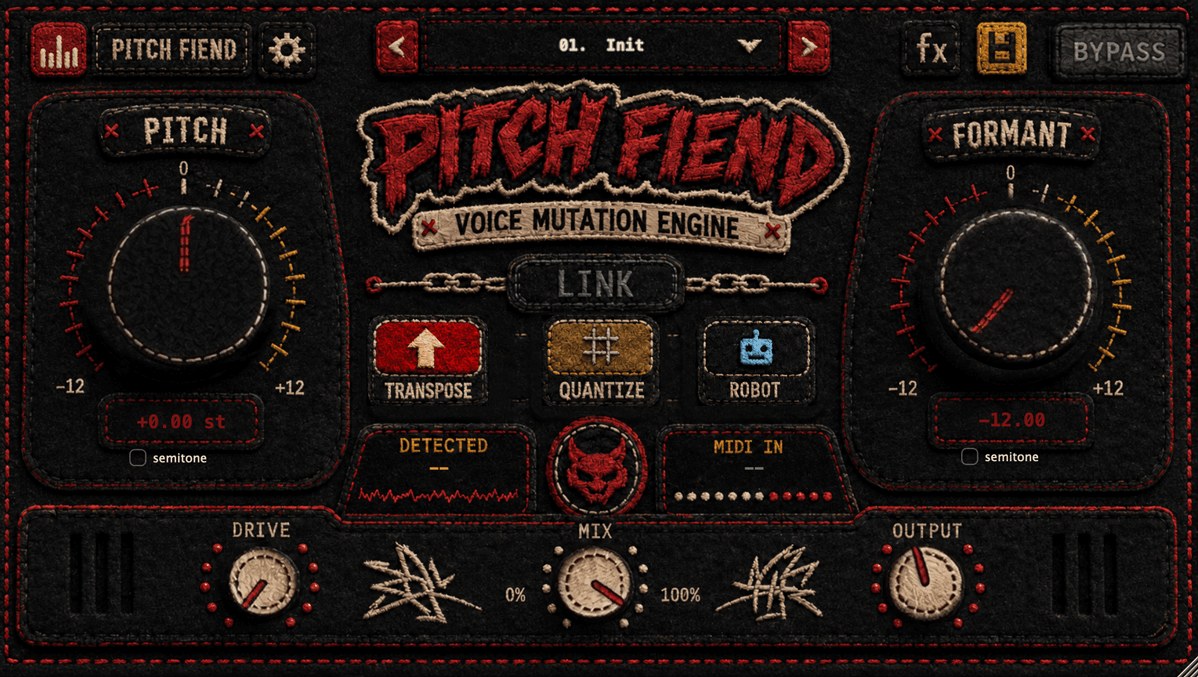
Three ways PITCH FIEND changes pitch
Before MIDI, know which mode does what — because you don’t always need to play
notes in:
- Transpose — shifts the whole vocal by a fixed amount (and, with MIDI, by the
interval you play). Best for harmonies and octaves that follow the original
melody. - Quantize — snaps every note to the nearest semitone automatically. No MIDI
needed — great for a quick hard-tuned, in-key feel. - Robot — forces every syllable onto one target note. Feed it MIDI and the
vocal sings your melody. This is the one that actually rewrites the notes.
Rewrite a melody with Robot mode + MIDI
- Load PITCH FIEND on your vocal track and set Mode → Robot.
- Route MIDI to the plugin (see your DAW below) and draw or play a melody.
- Each MIDI note you hold forces the voice to that pitch — so the vocal now
follows the notes you programmed, not the ones that were sung. - Keep notes legato (slightly overlapping) so the voice glides between them
instead of retriggering. - To keep it natural, leave Formant near 0 (push it down only if you want
the darker, bigger sound). Use the Deep formant quality on exposed leads.
Want harmonies instead of a rewrite? Switch to Transpose: with MIDI, the note
you play sets the interval (play a third or fifth above to stack a harmony that
tracks the original performance). Duplicate the vocal to a second track for each
harmony voice.
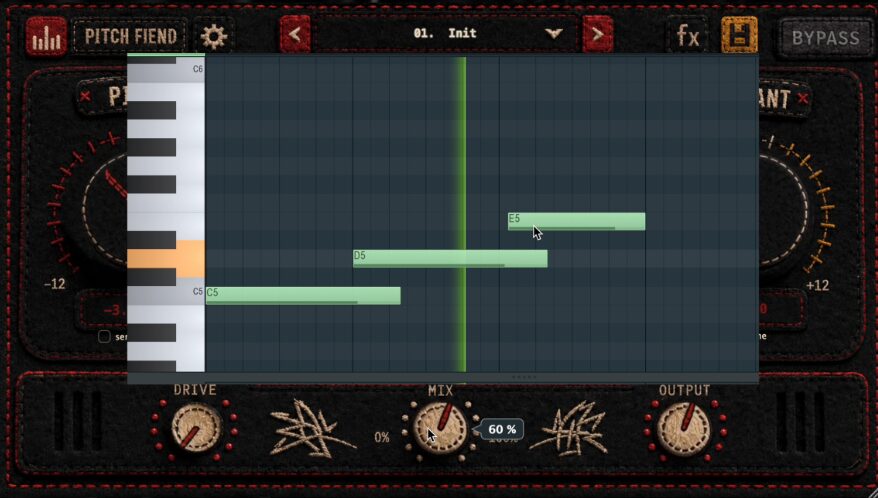
How to send MIDI to PITCH FIEND in your DAW
PITCH FIEND is an audio effect that also accepts MIDI notes. Routing MIDI to
an effect is slightly different in every DAW — here’s the short version for each.
(Exact menu names vary by version.)
Ableton Live
1. Put PITCH FIEND on the vocal (audio) track, Mode → Robot.
2. Create a MIDI track.
3. On that MIDI track, set MIDI To → [vocal track] → PITCH FIEND.
4. Arm/monitor the MIDI track, then draw your melody in a clip.
FL Studio
1. Add PITCH FIEND to the vocal’s Mixer insert.
2. In the plugin wrapper, open Settings (gear) → MIDI and set an Input port
(e.g. 1).
3. In the Channel Rack add a MIDI Out channel and set its output port to
the same number (1).
4. Program the melody in that channel’s piano roll — it now drives PITCH FIEND.
Logic Pro
Logic lists MIDI-capable effects under AU MIDI-controlled Effects. Insert
PITCH FIEND on the vocal track, then create a MIDI/Software-Instrument track routed
to that instance and record your melody. (See Logic’s “MIDI-controlled effects”
help for the exact routing in your version.)
Cubase / Nuendo
1. Insert PITCH FIEND on the vocal track.
2. Create a MIDI track and open its Output routing — Cubase lists
MIDI-accepting insert plugins there; choose PITCH FIEND.
3. Draw the melody on the MIDI track.
Reaper
1. Add PITCH FIEND to the vocal track’s FX chain.
2. Put a MIDI item on the same track with your melody — Reaper feeds the
track’s MIDI (and audio) straight through its FX chain to the plugin.
Pro Tools
1. Insert PITCH FIEND (AAX) on the vocal track.
2. Create a MIDI or Instrument track and set its MIDI output to the
PITCH FIEND insert.
3. Record or draw the melody.
Studio One
Studio One routes MIDI to instruments more easily than to audio inserts. If your
version can’t target the insert, use Quantize mode (no MIDI needed) for an
automatic in-key result, or place the vocal on a track setup that accepts MIDI.
Can’t route MIDI at all? Use Quantize — it snaps notes to the nearest
semitone with no MIDI, giving you a clean, in-tune vocal in one click.
Tips for a believable result
- Match the syllables. Line up MIDI notes with the words — one note per
syllable usually sounds most natural in Robot mode. - Legato = glides, gaps = resets. Overlap notes for smooth slides; leave gaps
where you want a clean re-articulation. - Don’t over-shift the formant. Big formant moves change the character; keep
it neutral if you only want to change the notes. - Finish in the box. PITCH FIEND’s built-in FX rack (filter, chorus, delay,
12-IR reverb) lets you polish the re-pitched vocal without extra plugins — it
sits alongside our other
FX plugins.
Try it: hear the dry-to-FIEND comparison and grab PITCH FIEND on the
PITCH FIEND product page.
FAQ
Can I change a vocal’s melody without re-recording?
Yes. Put PITCH FIEND in Robot mode, feed it MIDI, and the voice is forced to the
notes you play — so you can rewrite the melody from your keyboard.
Do I need MIDI to fix the tuning?
No. Use Quantize mode, which snaps every note to the nearest semitone
automatically. Use MIDI (Robot or Transpose) when you want to control the exact
notes or add harmonies.
Why isn’t the plugin receiving MIDI?
MIDI-to-effect routing differs by DAW — make sure a MIDI track’s output is pointed
at the PITCH FIEND instance (see the per-DAW steps above), and that the track is
armed/monitored.
The post How to Change a Vocal’s Notes (Melody) with PITCH FIEND appeared first on Producer Sources.