iZotope’s Stutter Edit 2 changed how producers think about glitch. Instead of drawing stutters onto a grid, you play them – buffer repeats, rolls and gates triggered from your MIDI keyboard like an instrument. It is powerful and performance-focused, and for live glitch design there is nothing quite like it.
But that power comes with two costs: a real learning curve, and a price to match. And for a lot of everyday jobs – “roll the last snare,” “stutter this vocal ad-lib,” “screw this section” – it is more plugin than you need. This guide covers the best Stutter Edit alternative for producers who want beat-repeat they can dial in seconds, with more than just stutter under the hood.
(Prices, versions and features change over time – always check the developer’s current page before buying.)
What Stutter Edit 2 is great at
Stutter Edit 2 is built around gestures – programmed sequences of stutter, filter, pan and other moves that you trigger from MIDI notes. Its strengths:
- Playable, performance-style glitch. Hold a key, get a roll; different keys fire different gestures.
- Deep generators and banks for building custom stutter behaviour.
- Filter, pan, delay and reverb baked into the gestures for finished-sounding results.
- Great for sound design and live sets where you want to improvise chaos.
If your workflow is “play glitch in like an instrument,” Stutter Edit 2 is a specialist worth owning.
Where it can be overkill
The same design that makes Stutter Edit powerful makes it heavy for simple tasks:
- It usually needs MIDI to trigger. You map notes, arm gestures and play them, rather than turning a knob.
- It is a learning curve. Generators, banks and gesture editing take time to master.
- It is priced as a premium tool.
- It is a stutter/glitch specialist. It does not do halftime slowdown, independent pitch shifting or tape character.
For a producer who just wants a fast roll or a screwed section, that is a lot of setup for a small idea.
SLoOWD – beat-repeat you dial in seconds
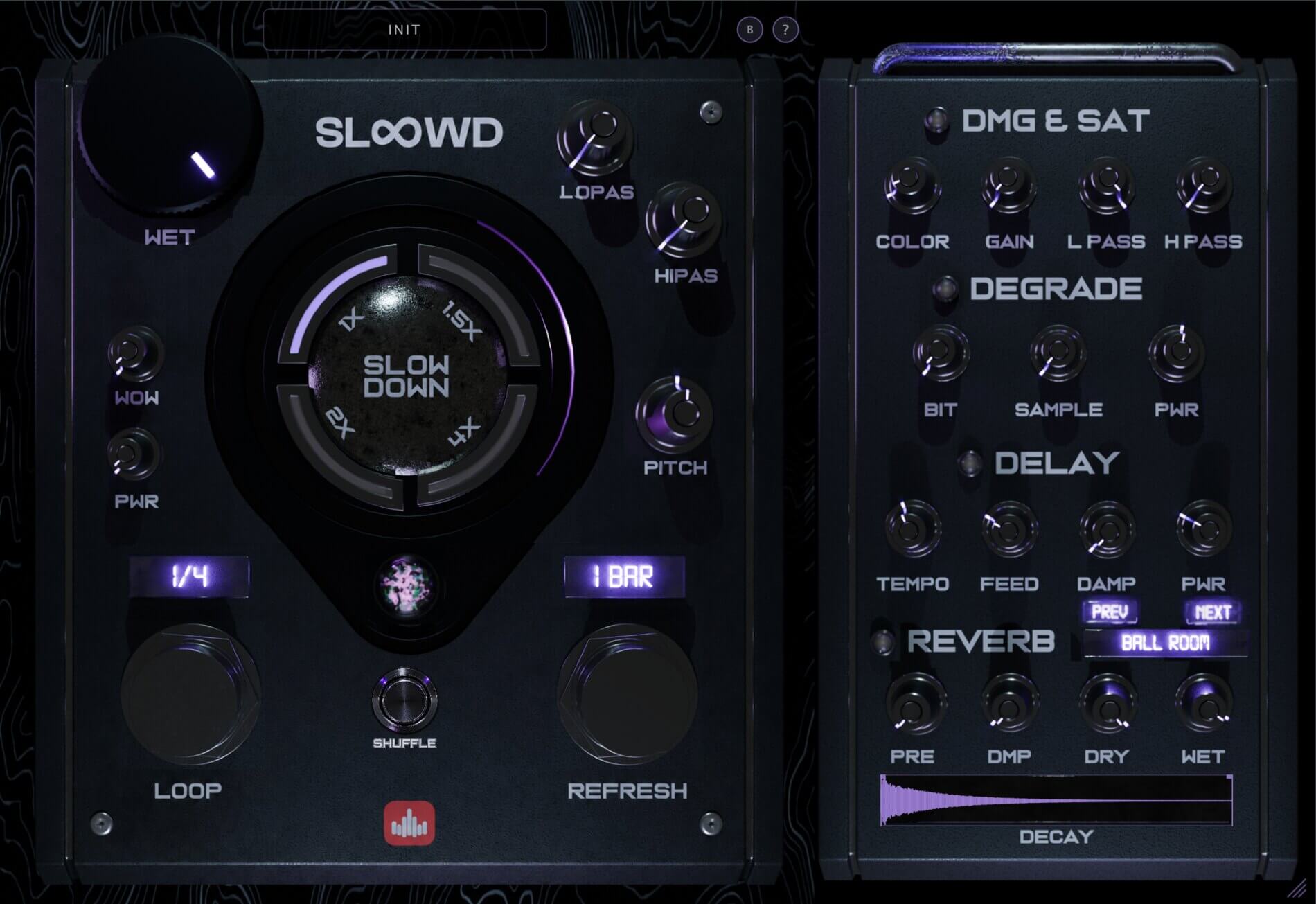
SLoOWD puts the stutter and roll sound directly on knobs – no MIDI mapping, no gesture editing – and surrounds it with the rest of the beat-mangling chain.
Knob-driven beat-repeat
The tempo-synced stutter engine runs from 1/16 up to 8 bars. An independent Refresh rate decides how often it grabs a new slice – that single control is the difference between a steady chop, a held roll and a glitchy, ever-changing gate. You hear it move as you turn it; there is nothing to arm.
Shuffle randomizer
One click on Shuffle throws a fresh random variation across the whole engine. It is the fastest way to stumble onto a roll or texture you would not have programmed by hand.
Halftime and slowdown
SLOW DOWN at 1x, 1.5x, 2x or 4x gives you the halftime and screwed drops that Stutter Edit simply does not do.
Independent pitch
Pitch shifts +/-24 semitones independent of speed – screwed vocals, octave 808s, detuned stabs.
Freeze
Freeze locks a slice into an infinite pad or drone.
A full FX rack
Tape, filters, saturation, a degrade bitcrusher, tempo delay and a reverb with 20 types – the finishing effects, built in.
Stutter Edit 2 vs SLoOWD
| Stutter Edit 2 | SLoOWD | |
|---|---|---|
| Beat-repeat / stutter | Yes (MIDI gestures) | Yes (knob-driven) |
| Learning curve | Steeper | Fast |
| Needs MIDI to trigger | Often | No |
| Halftime / slowdown | No | Yes (1x-4x) |
| Pitch shift | No | Yes (+/-24 st) |
| Freeze / hold | No | Yes |
| Tape / degrade | No | Yes |
| Reverb + delay | Via effects | Yes (20 reverb types) |
| Randomizer | No | Yes (Shuffle) |
| Formats | VST3 / AU / AAX | VST / VST3 / AU |
| Price | Higher | Paid (lower) |
| CPU | Medium | Light |
Which workflow are you?
You perform glitch live and design custom gestures. Stutter Edit 2 is a specialist and worth it – stay with it.
You want fast rolls, halftime and screwed textures without a MIDI setup. SLoOWD gets you there in seconds, does more, and costs less. For most producers most of the time, that is the better fit.
A quick beat-repeat recipe in SLoOWD
- Insert SLoOWD on the drums.
- Set Loop to 1/8 for the base chop.
- Shorten Refresh until it becomes a machine-gun roll.
- Automate the roll onto the last beat of the bar for a fill.
- Add a little Degrade for digital bite, or hit Shuffle to find a variation.
No gestures, no key mapping – just the sound.
Frequently asked questions
Is SLoOWD as deep as Stutter Edit 2 for live glitch? For programmed, MIDI-performed gesture design, Stutter Edit 2 is deeper. For fast, knob-driven beat-repeat plus halftime, pitch and FX, SLoOWD is quicker and broader.
Do I need a MIDI controller to use SLoOWD? No. Everything is on knobs and can be automated by your DAW.
What formats and systems does it support? VST, VST3 and AU on macOS (Apple Silicon and Intel) and Windows.
Can it do vocal stutters too? Yes – it works on any audio, so vocal chops, ad-lib stutters and instrument rolls are all fair game.
The verdict
Stutter Edit 2 is a brilliant specialist for performed, MIDI-mapped glitch. But if you want beat-repeat you can dial in seconds that also handles halftime, pitch, tape and reverb in one window – at a lower price and lighter CPU – SLoOWD is the more practical Stutter Edit alternative for the majority of producers.
Get SLoOWD -> VST / VST3 / AU for macOS and Windows.
The post The Best Stutter Edit Alternative for Beat Repeat appeared first on Producer Sources.