Beat-repeat and stutter effects – rolls, gates, machine-gun retriggers and glitch fills – are how producers add movement, tension and drama to drums and vocals. They are the difference between a loop that just plays and a beat that lurches into the drop. Here are the best beat-repeat plugins in 2026, ranked and compared by price, CPU and formats.
(Prices, versions and features change – always check the developer’s current page before buying.)
What to look for in a beat-repeat plugin
The plugins below take very different approaches, so here is what separates them.
- How you trigger it. Some are knob-driven (turn and hear it), some are MIDI-performed (play stutters like an instrument), some are step-sequenced (draw patterns on a grid). This is the biggest workflow difference.
- Rate range. Good stutter engines cover everything from fast 1/32 rolls to whole-bar holds.
- Slice refresh. The best tools let you control how often a new slice is grabbed, separately from the repeat rate – that is what makes rolls evolve instead of sounding static.
- Extras. Does it also do halftime, pitch, tape or reverb, or is it stutter-only?
- CPU and formats. Lighter and cross-DAW is better if you run several instances.
The beat-repeat plugins compared
| Plugin | Stutter / repeat | Trigger | Extra time FX | Built-in FX | Formats | Price | CPU |
|---|---|---|---|---|---|---|---|
| SLoOWD | 1/16-8 bars + Refresh | Knobs | Halftime, pitch, freeze | Tape, degrade, delay, 20-type reverb | VST / VST3 / AU | $$ | Light |
| iZotope Stutter Edit 2 | Yes (gestures) | MIDI | No | Filter, delay, reverb | VST3 / AU / AAX | $$$ | Medium |
| Sugar Bytes Effectrix | Yes (step seq) | Sequencer | Scratch, stretch | Many | VST3 / AU | $$$ | Medium |
| dblue Glitch 2 | Yes (step seq) | Sequencer | Stretch, retrigger | Some | VST / AU | $$ | Medium |
| Stock DAW beat-repeat | Basic | Host | No | No | Native | Free | Light |
1. SLoOWD – best knob-driven beat-repeat, all-in-one
Best for: fast rolls and stutters that also do halftime, pitch and FX.
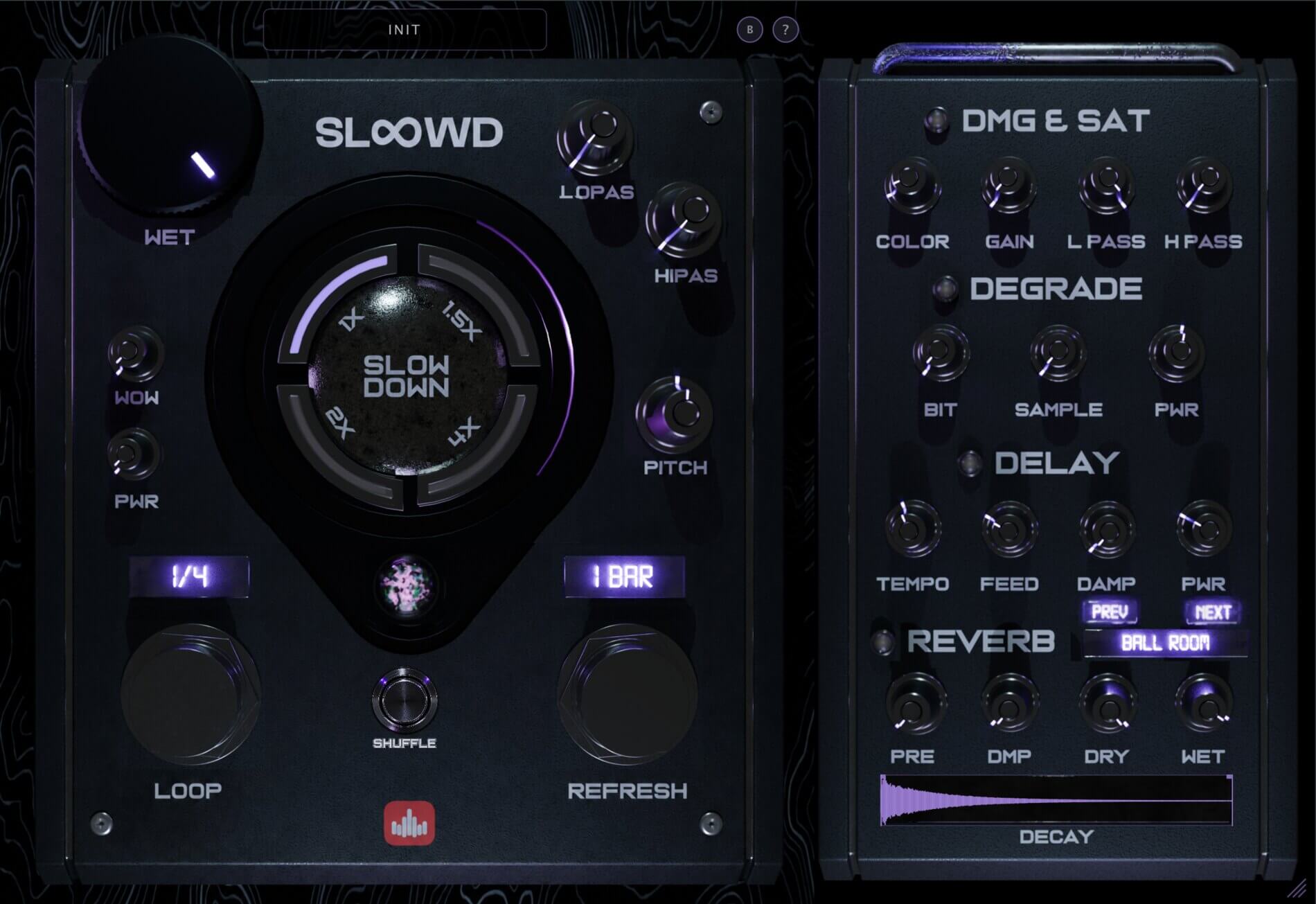
SLoOWD’s stutter engine is tempo-synced from 1/16 up to 8 bars, and its standout feature is the independent Refresh rate: it decides how often the engine grabs a new slice, which is exactly what turns a steady chop into a machine-gun roll, a held gate or ever-changing glitch. There is no MIDI mapping or grid to draw – you turn a knob and hear it move.
Around that it layers halftime (1x-4x slowdown), +/-24 st pitch, a Freeze buffer hold, a one-click Shuffle randomizer, and a full FX rack (tape, filters, saturation, degrade, tempo delay and a 20-type reverb). It is the best value if you want a complete beat-mangler rather than a stutter-only specialist.
Pros: instant, knob-driven; Refresh control is genuinely powerful; halftime + pitch + FX built in; cross-DAW; light CPU. Cons: not a MIDI-performance instrument like Stutter Edit. Formats: VST / VST3 / AU.
2. iZotope Stutter Edit 2 – best for performed, MIDI glitch
Best for: playing stutters in live as gestures.
Stutter Edit 2 is the deepest performance tool here – stutter “gestures” triggered from MIDI, with generators and banks and built-in filter/delay/reverb. It is steeper to learn and the priciest option, but unmatched for live glitch design and sound-design detail.
Pros: playable, deep, finished-sounding gestures. Cons: learning curve; usually needs MIDI; premium price.
3. Sugar Bytes Effectrix – best step-sequenced multi-FX
Best for: drawing stutter, scratch and effect patterns on a grid.
Effectrix sequences a whole rack of effects (including stutter, stretch and scratch) across a step grid. It is fantastic for pattern-based mangling and transitions, and sits somewhere between a beat-repeat and a full multi-FX.
Pros: huge pattern flexibility; lots of effects. Cons: grid workflow; more of a multi-FX than a dedicated beat-repeat.
4. dblue Glitch 2 – best budget glitch sequencer
Best for: glitch textures on a step sequencer at a lower price.
The successor to the legendary free Glitch, Glitch 2 sequences retrigger, stretch, tape-stop and more. It is excellent chaos-per-dollar, though editing is grid-based rather than instant.
Pros: great value; classic glitch character. Cons: step-grid editing; medium CPU.
5. Your DAW’s built-in beat-repeat – the free start
Best for: simple rolls with no extra purchase.
Ableton’s Beat Repeat and similar stock devices cover basic rolls for free. Fine to start with; limited on sound-design depth and finishing FX.
Pros: free; already installed. Cons: basic; no extras.
Beat-repeat tips that make fills sound pro
- Automate the roll onto the last beat of a bar rather than leaving it on – the contrast is the effect.
- Use a shorter Refresh (or new slice) for the final hit so the roll accelerates into the drop.
- Filter or degrade the stutter so it reads as a designed fill, not a glitch by accident.
- Try stutters on vocals, not just drums – chopped ad-libs are a signature modern sound.
- Blend with the dry so the beat keeps its groove under the fill.
Frequently asked questions
What is the best beat-repeat plugin? For fast, knob-driven rolls that also do halftime, pitch and FX, SLoOWD is the best all-rounder. For MIDI-performed glitch, Stutter Edit 2; for pattern drawing, Effectrix.
Is there a free beat-repeat plugin? Yes – most DAWs include a basic beat-repeat device, and dblue’s original Glitch was free. For deeper, all-in-one work a paid plugin is worth it.
Can I use beat-repeat on vocals? Absolutely. Vocal stutters and chopped ad-libs are one of the most popular uses – any of these work on vocal tracks.
Which is easiest to learn? Knob-driven tools like SLoOWD are the fastest to get a result from; gesture- and grid-based tools trade speed for depth.
The verdict
For live, MIDI-performed glitch, Stutter Edit 2 leads; for pattern drawing, Effectrix. But if you want beat-repeat you can dial in seconds that also handles halftime, pitch and a full FX rack in one plugin, at a friendly price and light CPU, SLoOWD is the best all-round beat-repeat plugin of 2026.
Get SLoOWD -> VST / VST3 / AU for macOS and Windows.
The post Best Beat Repeat & Stutter Plugins (2026) appeared first on Producer Sources.