FL Studio already ships two pitch tools, which is more than most people realise. If you are shopping for an autotune plugin for FL Studio, start by opening what you own, then buy only when you know what is missing.
Quick answer: Pitcher is included with Producer Edition and above and is genuinely usable. Buy when you need better scale coverage, a clean-up stage before detection, or the vocal effects in the same window. NEOTUNE Pro at $29.99 covers all three and ships VST3 and VST2. The setup steps that trip people up are the plugin search path and running the scan.
Disclosure: ProducerSources makes NEOTUNE Pro and sells FL Studio and several compared plugins. Prices were checked on September 26, 2026.
What you already have
Pitcher is the real-time one: key, scale, correction speed and harmony, included from Producer Edition up. If you have never opened it, do that first.
Newtone is the offline one, for working on a clip after the take rather than correcting live. Also included from Producer Edition up.
Where people run out of road: the scale library is basic, there is no clean-up stage ahead of the pitch detection, and there is very little between “corrected” and “finished”. You will still be loading a compressor, a saturator, something for doubling and something for harmony.
Comparison
Price checked September 26, 2026.
| Plugin | Price at check | Real-time | Beyond the correction |
|---|---|---|---|
| Pitcher | Included, Producer Edition and above | Yes | Harmony |
| NEOTUNE Pro | $29.99 | Yes | Clean-up, formants, vibrato, harmony, talkbox, FX, MIDI |
| Waves Tune Real-Time | $39.99 | Yes | Nothing |
| UAD Topline Vocal Tune | $99 | Yes | Formant and pitch shift |
| Slate MetaTune | $149 | Yes | Instance groups |
| AutoTune | $300 perpetual | Yes | Harmony, throat modelling |
| Auburn Sounds Graillon 3 | Free, $29 full | Yes | Character, microtuning in full |
Installing a plugin in FL Studio
Almost all the frustration here has two causes: the plugin went somewhere FL Studio does not look, or the scan was never run.
1. Install the VST3. Windows default is C:Program FilesCommon FilesVST3. macOS is /Library/Audio/Plug-Ins/VST3. Use the installer’s default unless you have a reason not to.
2. Check the search path. Options > Manage plugins, and look at the plugin search paths list. The folder above should already be there. If you installed somewhere custom, add that folder.
3. Run the scan. Same window, click Find plugins. Tick “Verify plugins” if it is new to this install.
4. Favourite it. Find it in the plugin list and click the star. Without this it will not appear in the quick lists and you will conclude it did not install.
5. If it still does not appear: check you installed the 64-bit version, that you are not looking under VST2 for a VST3, and that antivirus did not quarantine the file mid-install. Restarting FL Studio after a scan resolves a surprising amount.
Where to put it in the chain

Order matters more than plugin choice.
1. Clean-up first. High-pass at 80 to 100 Hz, notch mains hum at 50 or 60 Hz if present, gentle de-ess if the take is harsh. The pitch tracker sees this signal, and a clean signal is a confident tracker. A tuner with a clean-up stage built in does this inside the plugin, ahead of detection, which is better still.
2. Tuning second, before compression. Compression flattens the dynamics the tracker uses to find note boundaries, so tuning a compressed take is measurably less stable.
3. Compression third. Now you are compressing something already in tune, so the level rides predictably.
4. Saturation, doubling, effects last.
The full chain with settings is in how to mix trap vocals.
Setting the channel up properly
Use a Mixer insert, not the Channel Rack. Route the audio clip or the input to a dedicated mixer track and put the plugin there. This is the single most common structural mistake in FL Studio vocal chains.
Set the buffer sensibly. Options > Audio settings. 128 or 256 samples while tracking keeps monitoring comfortable; raise to 512 or 1024 while mixing to stop dropouts.
Understand plugin delay compensation. FL Studio compensates automatically on mixer tracks. If a render sounds slightly late against the beat, check PDC is enabled for that track rather than nudging the clip, because nudging breaks the moment you change the chain.
Freeze or render before stacking. Five vocal layers each with a tuner is a lot of CPU. Consolidate once you are happy.
NEOTUNE Pro in an FL Studio session
The specific argument here is that it replaces several inserts rather than adding one more.
Correction, Speed 0 to 400 ms, Note Transition, Flex and Humanise cover the range from transparent to fully stepped. Then in the same window: a Clean stage before detection with low cut, hum notch and gating; Voice with formant shifting to 12 semitones and six voice models; Vibrato with onset delay; Harmony with two scale-aware voices, doubler, unison and octaves; Talkbox with ten carrier waveforms; FX with compression, drive and growl; and MIDI, so you can play the target notes from a controller with chord lock and glide, which suits how FL users already work in the piano roll.
It ships VST3 and VST2 for FL Studio, plus AU, AAX and a standalone app, and files under Pitch Shift so it lands beside other tuners rather than in “Unsorted”. 37 scales, 21 of them microtonal or non-Western.
$29.99, one payment. One machine at a time, moveable from your account.
See NEOTUNE Pro
A working vocal chain
Top to bottom on one mixer insert:
| Slot | Plugin | Starting point |
|---|---|---|
| 1 | Fruity Parametric EQ 2 | High-pass 80 Hz, narrow notch at 50/60 Hz if hum is audible |
| 2 | Tuner | Correction 100%, Speed per the sound you want |
| 3 | Compressor | 3:1, medium attack, 4 to 6 dB on peaks |
| 4 | Saturation | Light. Audible only when you bypass it |
| 5 | De-esser | Only if compression brought sibilance forward |
| 6 | Delay and reverb | On sends, not inserts |
For hard-tuned rap specifically, autotune settings for rap vocals has separate starting points for verses, hooks and ad-libs.
Common FL Studio problems
The plugin does not show up. Scan not run, wrong search path, or you are looking under VST2 for a VST3. Manage plugins > Find plugins, then restart.
The vocal is out of time after tuning. Plugin delay compensation. Check it is on for that mixer track.
Crackling while tracking. Buffer too small for the plugin count. Raise it, or track with only the tuner enabled.
The tuning warbles on held notes. Detection, not correction. High-pass harder, notch the hum, narrow the detection range. Why does autotune sound warbly.
It sounds robotic when you did not want that. Speed too low. Try 20 ms and add some Flex. See how to make autotune sound natural.
Harmonies sound wrong. Parallel shifting instead of scale-aware shifting, or the wrong key.
Frequently asked questions
Does FL Studio come with autotune? Yes, two. Pitcher for real-time correction and Newtone for working on a clip after the take, both included in Producer Edition and above.
How do I autotune in FL Studio step by step? Route the vocal to a mixer insert, add an EQ with a high-pass, then the tuner after it. Set key and scale to match the song, set retune speed for the sound you want, then compress after the tuner rather than before.
Why is my autotune plugin not showing in FL Studio? The scan has not been run, or the install folder is not in the plugin search paths. Options > Manage plugins, add the folder, Find plugins, then favourite the plugin.
Should I autotune before or after compression? Before. Compression flattens the dynamics the pitch tracker uses to find note boundaries.
Does autotune add latency in FL Studio? A little, and FL Studio compensates automatically on mixer tracks. If a render sounds late, check PDC is enabled for that track.
What is the best free autotune for FL Studio? Pitcher, because you already own it. After that, Graillon 3.
Is Pitcher good enough for professional work? For straightforward correction and simple harmony, yes. People move on when they want better scale coverage, a clean-up stage before detection, or the vocal effects in the same window.
Can I use VST2 plugins in FL Studio? Yes, it scans both. If a plugin ships both, prefer the VST3.
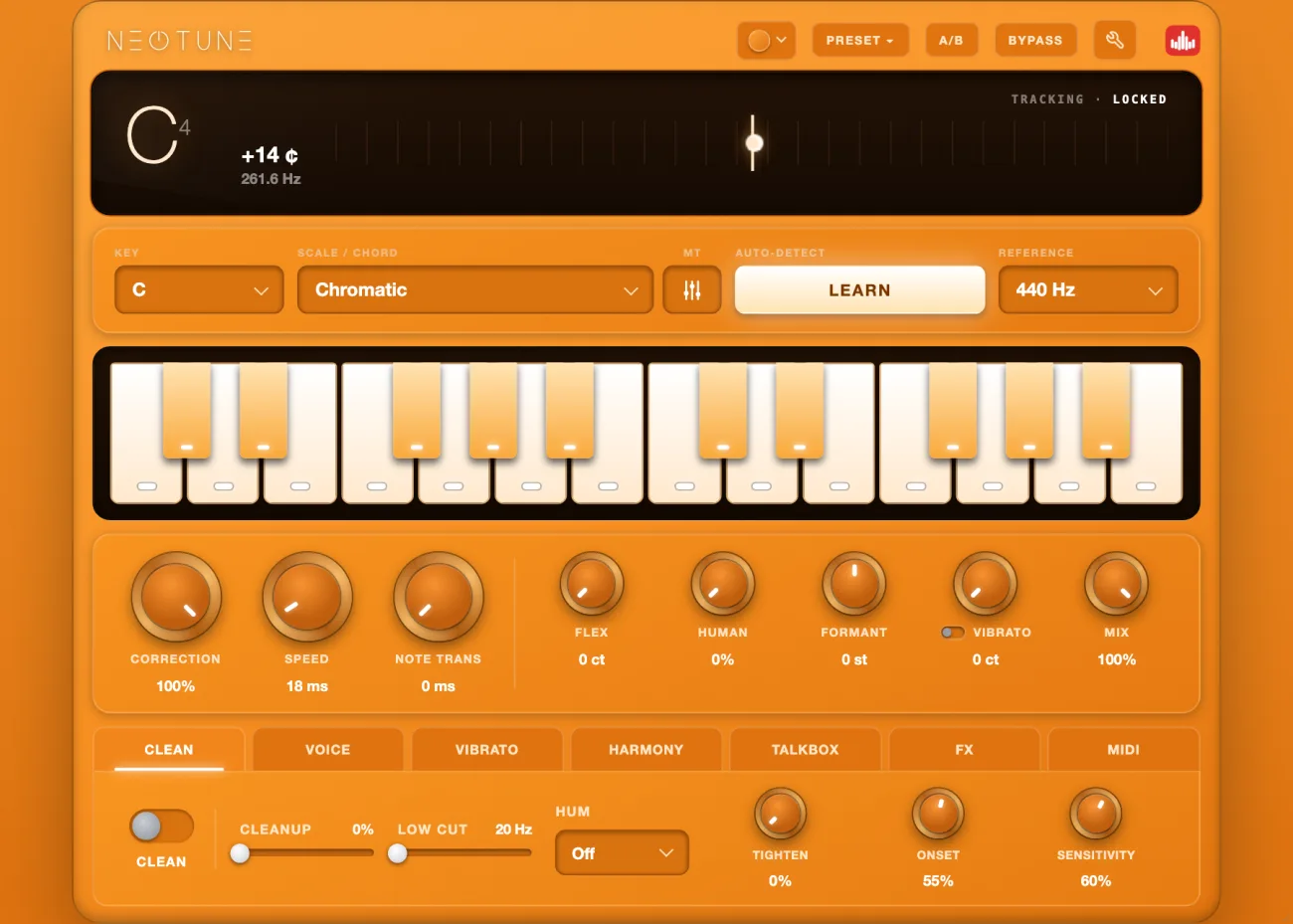
NEOTUNE Pro ships VST3 and VST2 for FL Studio, plus AU, AAX and a standalone app. 37 scales, seven modules, and it files under Pitch Shift so it lands where you expect. $29.99. See the plugin.
Related: the best autotune plugins of 2026 and 7 best Auto-Tune alternatives.
The post The Best Autotune Plugin for FL Studio in 2026 (and How to Set It Up) appeared first on Producer Sources.